ポテンショスタットへの基準電圧供給をプログラム制御したいということで、 mV 単位で電圧発生できるバイポーラ電源を物色していたのだけれど、 なかなかよいものがなく、こちらに登場いただくこととなった。 GPIB 接続(!) なので、いまどきの USB-Serial に比べるとちと面倒。 あと、まだ SCPI の時代じゃなかったのでコマンド調べるのにマニュアルの熟読が必要。
まあ Keysight VISA + python は 去年やった ので、そこそこ土地勘はあるところ。
ちなみに TR6143 は 13 年前に C で制御プログラムを書いてた( このへん )。すっかり忘れてた。
@ python のインストール:
自分の PC も Win11 にしてから入れてなかったので改めて。
anaconda は環境が重いので、python.org のバイナリを入れる。いまは
Windows Store から Python Install Manager
を入れるのが推奨のようなのでそうする。
ダウンロードして実行。
最後に
コマンドプロンプト(自分は Windows Terminal から)を開いて
ダウンロードして実行。
Welcome to the Python installation manager configuration helper.

********************************************************************************

Windows is not configured to allow paths longer than 260 characters.

Python and some other apps can exceed this limit, but it requires changing a
system-wide setting, which may need an administrator to approve, and will
require a reboot. Some packages may fail to install without long path support
enabled.
Update setting now? [y/N]
に対して Y と入力。これは admin 権限がいる。リブートが必要と書いてあるけどしなかった気が(したかな?)
********************************************************************************

The global shortcuts directory is not configured.

Configuring this enables commands like python3.14.exe to run from your
terminal, but is not needed for the python or py commands (for example, py
-V:3.14).

We can add the directory (C:\Users\nakano\AppData\Local\Python\bin) to PATH
now, but you will need to restart your terminal to use it. The entry will be
removed if you run py uninstall --purge, or else you can remove it manually when
uninstalling Python.
Add commands directory to your PATH now? [y/N]
と
********************************************************************************

You do not have the latest Python runtime.

Install the current latest version of CPython? If not, you can use 'py install
default' later to install.

Install CPython now? [Y/n]
にもそれぞれ Y と入力。
最後に
view online help? [y/N]が出たので Y と答えたら、 4. Using Python on Windows が表示された。
コマンドプロンプト(自分は Windows Terminal から)を開いて
C:\Users\nakano>python3 --version
Python 3.14.2
と出たので、これでインストールは完了した模様。らくちん。
C:\Users\nakano> python3 -iも動いた。
@ パッケージのインストール:
とりあえず pyvisa を入れてみようと思ったが、
C:\Users\nakano>pip install pyvisa
'pip' は、内部コマンドまたは外部コマンド、
操作可能なプログラムまたはバッチ ファイルとして認識されていません。
となる。ChatGPT さんに聞いてみたら、いまの公式推奨は python3 -m pip で使う方式らしいのでそうする。
C:\Users\nakano>python3 -m pip install pyvisa
Collecting pyvisa
  Downloading pyvisa-1.15.0-py3-none-any.whl.metadata (7.1 kB)
Collecting typing_extensions>=4.0.0 (from pyvisa)
  Downloading typing_extensions-4.15.0-py3-none-any.whl.metadata (3.3 kB)
Downloading pyvisa-1.15.0-py3-none-any.whl (179 kB)
Downloading typing_extensions-4.15.0-py3-none-any.whl (44 kB)
Installing collected packages: typing_extensions, pyvisa
[....]
WARNING: The scripts pyvisa-info.exe and pyvisa-shell.exe are installed in 'C:\Users\nakano\AppData\Local\Python\pythoncore-3.14-64\Scripts' which is not on PATH.
  Consider adding this directory to PATH or, if you prefer to suppress this warning, use --no-warn-script-location.
Successfully installed pyvisa-1.15.0 typing_extensions-4.15.0
ということで PATH 絡みの警告は出たけど大丈夫っぽい。
@ Keysight IO library suite のインストール:
以前やったように
、
Keysight IO ライブラリ・スイート
のページ下部の Download Windows x64 IOLS
より。ダウンロードした 2025 Update1 の IOLibrariesSuite-21.2.207-windows-x64.exe
は研究室の samba フォルダ
インストール完了後、 スタートメニューに登場した Keysight Connection Expert を起動し、PC を 82357A を介して R6144 に接続すると、以下のような画面になって無事接続できた模様。
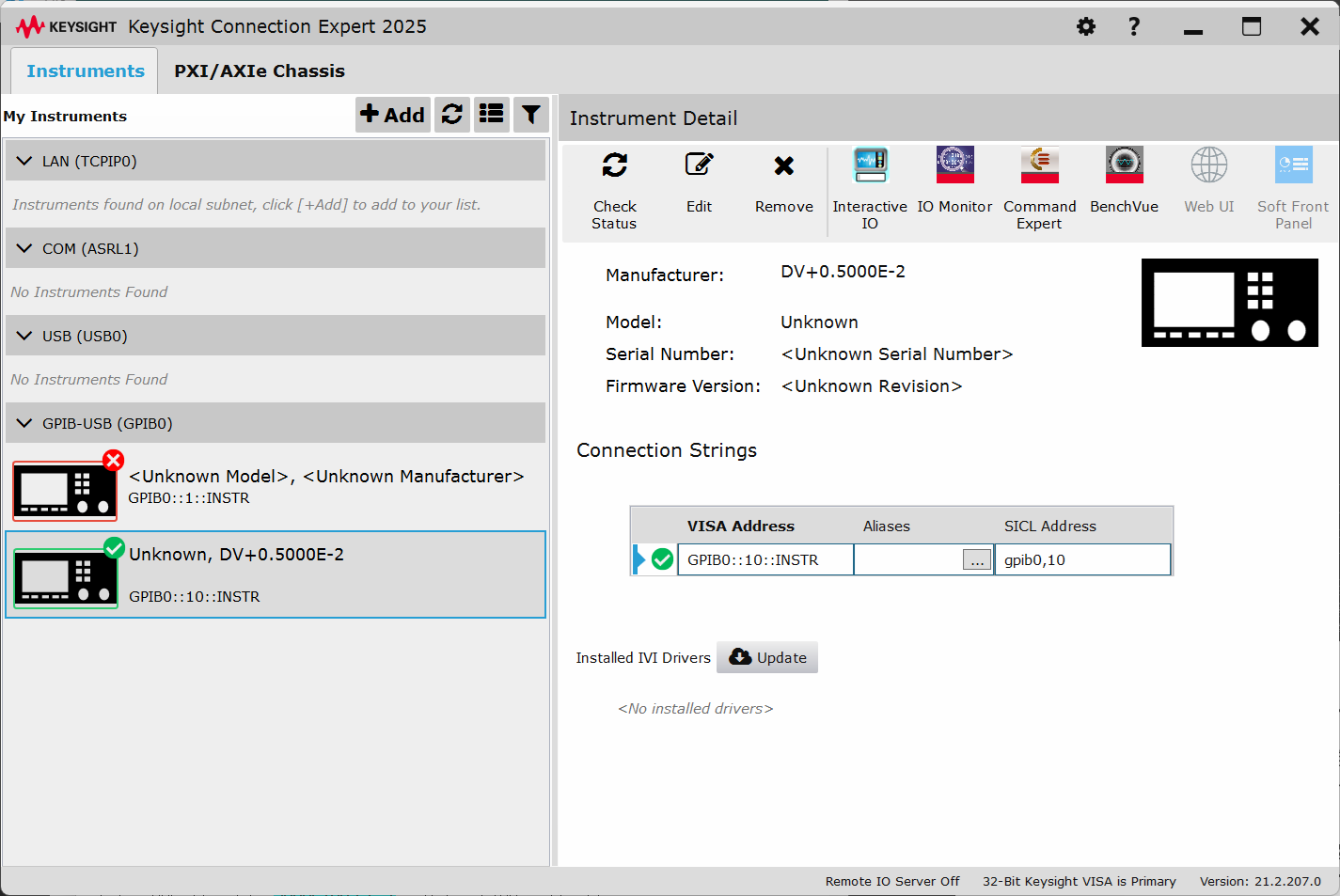
GPIB0::1::INSTR は TR6143 を接続したときの残骸。
U:\common\archive\WinDriverに置いておいた。これもインストールには PC の admin 権限がいる。
インストール完了後、 スタートメニューに登場した Keysight Connection Expert を起動し、PC を 82357A を介して R6144 に接続すると、以下のような画面になって無事接続できた模様。
GPIB0::1::INSTR は TR6143 を接続したときの残骸。
@ Visual Studio Code:
WSL からは普通に呼んでいたので入っているのかと思ったんだが、スタートメニューから呼べなかったので MS Store からインストール。しかしこれもスタートメニューに登場しなかったので、いっぺん 設定>アプリ からアンインストールし、
公式
からダウンロードして入れたら大丈夫になった。x64-1.106.3。
@ python の R6144 通信のテスト:
ということで ~/project/R6144py を掘ってそちらに。研究室からは U:\nakano\project\R6144py\ として見えるはず。
R6144 のマニュアルは
こちら(研究室内部からのみ閲覧可)
コマンドラインから電圧文字列を受けとって、3 秒出力する python スクリプトを書いた。ソースはこんな感じ。
このあとは、電圧を発生させたあと USB リレー で WE への接続を ON にし、ポテンショスタットからの電流シグナル(-10mA~10mA を -1.0~+1.0 V で出力)をマルチメータで読んで積分し、設定電荷量になったらリレーを切り、電源を停止、というのを書けばよさそう。
ひとまず今日はこのへんで。
コマンドラインから電圧文字列を受けとって、3 秒出力する python スクリプトを書いた。ソースはこんな感じ。
import pyvisa
import sys
from time import sleep

class R6144:
    def __init__(self, rm, visaId):
        try:
            self.R6144 = rm.open_resource(visaId)    #R6144
        except:
            print("Cannot connect to R6144")
            while True:
                key = input("Press Enter to exit.")
                if not key:
                    break
            sys.exit()
        print("R6144 is ready for Voltage Output Op.")

    def sendcmd(self, cmdstr):
        self.R6144.write(cmdstr)

def VoltStr(arg1):
    if arg1[0] not in "+-":
        print("Error: argument must start with + or -")
        sys.exit(1)
    try:
        value = float(arg1)
    except ValueError:
        print("Error: invalid numeric value")
        sys.exit(1)
    if not -2.0 <= value <= 2.0:
        print("Error: value out of range (-2 to +2)")
        sys.exit(1)
    return format(value, "+.3f")

if len(sys.argv) < 2:
    print("Usage: python3 R6144.py [+|-] volt_val")
    sys.exit(1)

vout = VoltStr(sys.argv[1])

print(vout)

rm = pyvisa.ResourceManager()
r6144 = R6144(rm, 'GPIB0::10::INSTR')

r6144.sendcmd(f"V5 D{vout}V") # V5 can output -16 ~ +16 V

r6144.sendcmd("E")
sleep(3)
r6144.sendcmd("H")
R6144.py
として置いておいた。
このあとは、電圧を発生させたあと USB リレー で WE への接続を ON にし、ポテンショスタットからの電流シグナル(-10mA~10mA を -1.0~+1.0 V で出力)をマルチメータで読んで積分し、設定電荷量になったらリレーを切り、電源を停止、というのを書けばよさそう。
ひとまず今日はこのへんで。